-1.png?width=1150&height=344&name=Priceline%20Agoda%20Global%20Partner%20Services_Full%20Logo%20(23)-1.png)

Your rank. Your bid. Your call.
Boost Rank moves your property up when you decide it's worth it, and steps back when it's not. That's the whole idea.
|
|
||||
|
|


How it works
A ranking boost that runs on your terms
Boost Rank is a flexible, dynamic tool that lets you strategically enhance your performance on Priceline and Agoda. Set your bid, pick your audience and dates, and see the impact before you commit a dollar.
|


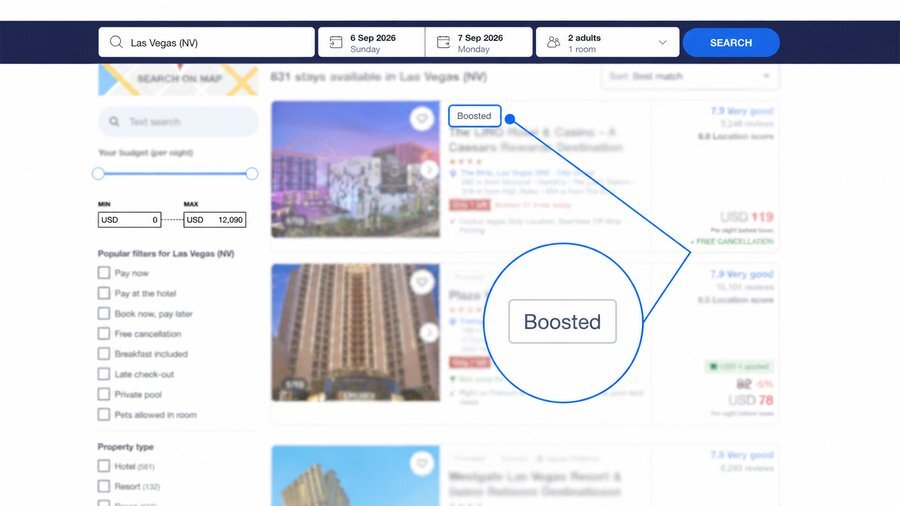
Full marketing flexibility at your fingertips.
 A visibility boost when you need it
Grow room nights and revenue with a ranking boost on Priceline and Agoda when you need it most. Select stay dates to target and let our algorithms put your property in front of your most likely customers.
|
 Target the travelers you want
Thinking of targeting a certain customer segment? Flexible settings like "Point of Sale" and "Lead Time" targeting allow you to focus your marketing effort with ease.
|
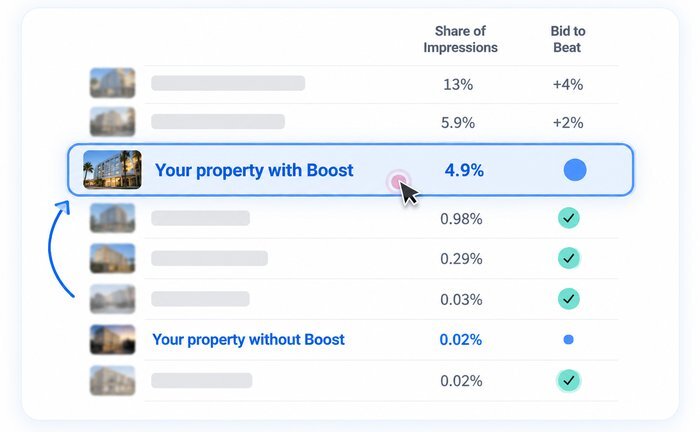
 Compare your property against competitors
Know exactly where you stand among your competitors in terms of visibility. When creating a Boost Rank campaign, we provide the estimates for you to determine the boost you need.
|
 |
 Revenue
0%
more with Rank
*Based on Priceline Agoda 2025 data. Estimated performance is not guaranteed. T&C apply.
|
Campaign strategy
↑ Back to top
Make every campaign earn its keep
 |
Open up availability and sharpen your rates. |
 |
Check performance estimates before you launch. |
 |
Run multiple campaigns across different periods or origins to widen your reach. |
 |
Stack campaigns for your biggest possible boost. |
 |
Double your bid when last-minute travelers are booking. That's when it counts most. |
 |
No hidden costs on cancellations. If a booking falls through, you're not charged — and any credits you used are refunded automatically. |
Insider knowledge
↑ Back to top
Tips from our marketing pros
 Have a marketing budget sitting around?
Put it to work with Boost Rank credits and set a specific spend for your campaign.
|
 Weekdays are wide open.
Run a weekday campaign and win the bookings your competitors are sleeping on.
|
Boost your Content Score first.
A strong Content Score on Partner Portal helps turn the extra visibility from Boost Rank into actual bookings.
|
Next steps
↑ Back to top
Let's get you ranked
Your Boost Rank campaign lives in the Partner Portal Extranet. Three steps and you're live.
|
1
|
Go to the Partner Portal |
|
2
|
Navigate to Growth Programs |
|
3
|
Click Boost Rank |
 |
Need a hand? Your dedicated market manager has you covered, or email our team at support@pricelineagoda.com. |
Quick answers
↑ Back to top
Frequently asked questions
What does increased visibility mean?
When you create a Boost Rank campaign, your property will be shown higher up in the ranking to the travelers you target.
In what platforms will my Boost Rank campaign apply?
Your Boost Rank campaign will provide your property more visibility across all Priceline and Agoda platforms.
Can I see the performance report of my Boost Rank campaign?
Yes, you can check the performance of your active, deleted, and expired campaigns under the YCS tab Marketing Solutions > Campaigns.
How do I pay for Boost Rank?
Boost Rank offers two payment options: Payout rate — each booking generated from a campaign is charged an additional percentage (your bid) on top of your contracted compensation, so you only pay when you get a booking. Credits — upload Boost Rank credits to pay for the campaign upfront via wire transfer, ePass, or credit card. The cost-per-booking percentage is deducted from your wallet once a booking is made, and if a booking is cancelled, your credits are reimbursed.
What bookings will be charged with the additional commission?
All bookings that satisfy your targeting options will be charged a Boost Rank fee. You can download a list of the affected bookings on the campaign details page by clicking "Download campaign bookings."
Can I modify my campaign?
Yes, you can edit your campaign any time by clicking "Edit campaign" on the campaign details page.
Can I delete the Boost Rank campaign any time? Can I do it myself?
Yes, you can delete your campaign any time by clicking "Delete campaign" on the campaign details page.
 © 2026 Priceline.com and Agoda.com. All rights reserved.